BOM & engineering
Keep product versions, process routes and work instructions connected to the order.
 AAVASmart Factory
APPLIANCE & ELECTRONICS ASSEMBLY · ON PREMISES
AAVA connects ERP orders, APS schedules and MES operations. Trace a fan order to a missing motor or an overloaded assembly shift, then ask your on-premises AI for the evidence.
The plan needs 772 minutes. The shift has 480 available.

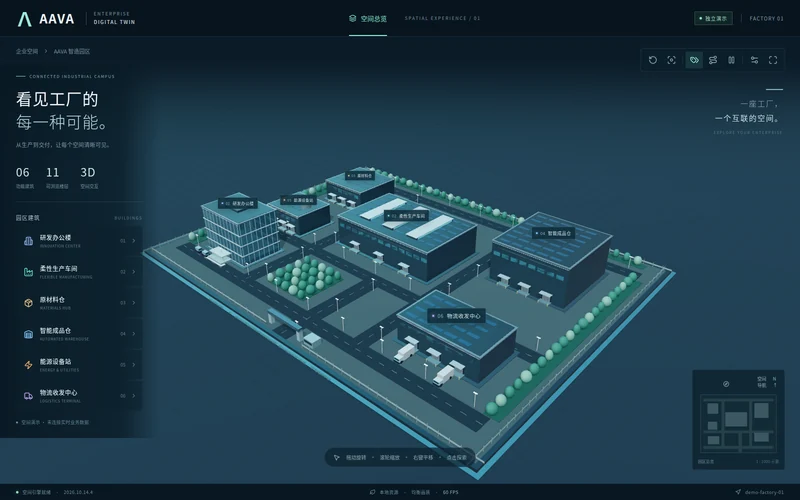
The campus illustrates navigation. Roles can open the same work order from the production floor.
BOM & processes · Materials · Production & quality · Delivery & finance
For appliance, PCBA and consumer electronics assembly teams of 20–100 people and growing. Trace orders for fans, rice cookers and coffee machines from scheduling and shop-floor reporting to purchasing and monthly close.
Both entrances open the same business record under the same role.
Follow a sales order line through engineering, requisitions, work orders, receipts and cost journals.
The assistant reads role-authorised data. Configured rules notify the duty contact and actions are recorded on the source document.
PRODUCTION PLANNING · TEST ORDER
The planner asks AAVA to explain the block. Assembly needs 772 minutes against 480 available in the shift, leaving a 292-minute shortfall.
Sample verified on 23 Nov 2026 in the isolated PMC workbench, orders MO-20261123-000001 and 000002. The figures measure shift capacity. Delivery promises and the effect on other customers require separate analysis.
Compare the two work orders →
01 / FOLLOW THE WORK
Explore the campus and production area,
then look inside a task workspace.
SPATIAL CONTEXT
Start with the campus layout to understand where production, storage and supporting teams work.
Teams can also start directly in their role workspace. This guide does not submit business operations.
These historical scenes and isolated validation screenshots illustrate the route. They are not a current production recording or proof that the scene is bound to the sample order.
02 / CONNECT THE PROCESS
ERP connects purchasing, inventory, cost and accounting. MES records production and quality. APS schedules work against material, equipment, staffing and shift constraints.
Keep product versions, process routes and work instructions connected to the order.
Follow demand, purchase orders, receipts and inspection before formal stock entry.
Work through operations, record actual execution and handle inspection and exceptions.
Connect finished goods, shipping and original business records to cost and accounting checks.
Trace the sales line to material availability, inspection release and station bookings to identify the team that can act.
Explore the workflow →This run needs 772 minutes in a 480-minute shift. Inspect the operation and its resource bookings before rescheduling.
Explore the workflow →Check the outstanding instalment and affected requisition lines. Reconcile motors retained for other models on the original order.
Explore the workflow →
Check inspection results and released quantity for the receipt line. In this example the operator submits results for independent review before warehouse posts the released units.
Explore the workflow →
Trace the invoice at the business cut-off and reconcile to the supplier and general ledgers. This sample had CNY 3 outstanding and was eight days overdue at November close.
Explore the workflow →
03 / ON-PREMISES AI
Run speech recognition, language models and speech synthesis on premises.
Connect business operations, enterprise telephony and cross-language communication.
AAVA connects employee calling and international simultaneous interpretation with the local ASR, LLM and TTS chain. Line access and supported language pairs follow the enterprise deployment.
Rules create alerts, tasks and notifications; local AI can analyse the evidence. Phone and email escalation require confirmed event adapters, channel configuration and delivery checks. Important business actions retain permissions, approval and audit.
Configured enterprise telephone and email channels route matching alerts to their owner. Delivery receipts and incident resolution are recorded separately.
AAVA / PRODUCT FILM
A fan order is due. Follow the people checking motors, work orders and stock across one factory.
Warehouse recording uses demo data. AI voice query is illustrative.
A customer is waiting for a fan order. Are the motors here? Can this batch ship today?
In AAVA, sales, production, warehouse and approvals work from the same business records.
How far along is this work order? On-premises AI retrieves authorized records you can check at the source.
Teams report each operation. When an equipment alert matches a rule, an AI call and email can reach the shift lead.
Scan a carton to check its recorded bin. Trace its origin and remaining quantity through stock movements.
Sales follows customers, planning checks materials, finance reviews costs. Each workspace brings the next task into view.
An order moves through scheduling, receipt and delivery. Each team follows the source record, with approvals and receipts.
AAVA. The AI-driven enterprise digital twin platform. Give every enterprise a digital world of its own.
04 / START WITH THE ESSENTIALS
Gather reliable materials, BOMs, processes and warehouse information.
Assign access and confirm necessary approval, quality and finance rules.
Check a complete business chain, common exceptions and role-specific tasks.
Introduce the agreed scope with clear guidance and maintenance responsibilities.
For a fan order, agree which records supply the due date, production date, released quantity and accounting cut-off.
One reference machine runs a quantized 9B model with 16 GB of GPU memory and CPU offload. Connect tablets, scanners and IP phones over the factory LAN. List simultaneous users and voice channels. Run the candidate model at peak concurrency before selecting server memory, GPU and network capacity.
Separate opening stock, unfulfilled sales and open purchase quantities. Identify fulfilled and cancelled amounts. Have warehouse and finance reconcile each batch to its original records.
Have each role use its own account. Rehearse a partial receipt or reversal, reconcile stock and ledger movements, then agree the cutover date.
People can work directly in their role workbench. The campus offers another way to open the same records.
It can use authorised order and schedule records. A capacity warning alone does not establish a missed delivery.
Request a walkthrough and describe one transaction. The team will contact you to agree a time.
Sizing depends on the model, concurrent users and voice workloads. Confirm the hardware with a representative factory workload.
The team confirms the date with you after receiving the request.
AAVA / SMALL APPLIANCES & ELECTRONICS ASSEMBLY
Start with the tasks that matter to your factory.